|
A Leading South African Test and Measurement Instruments Supplier |
|
“For Good Measure”® |
|
Please contact us by phone, email or visit us at the details given above. We look forward to hearing from you. |
|
Product List |
|
T.M.I. |
|
Test and Measurement Instruments C.C. |
|
CK 1985/007464/23 |
|
“Tomorrow’s Instruments Today” — “For Good Measure” ® |
|
TMI, Established—1982 |
|
English, Afrikaans, Portuguese Speaking. Master/Visa Credit Cards |
MSR145WD Updates |
MSR145WD Updates |
|
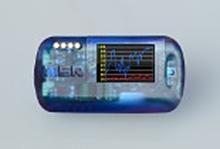
MSR145WD Wireless LED Cloud Data Logger Updates. |

|
T + M ® |


|
Excess Stock to be cleared while stocks last. > Click for More... |
|
Test our Service and Measure with our Instruments. |
|
Datasheet (249KB) |
|
Updated Most Important Features in June 2015 are as follows:
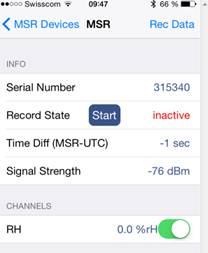
1. Optimised energy efficiency through the time-controlled connection of the MSR145WD data logger with the receiver (smartphone, tablet). As before, the data logger can be connected manually with the receiver by means of the key button at any time. However, in addition, the customer can now also select from several variants in order to determine the time of the BLE communication between the data logger and the device: a. Start and stop recording via MSR App: Previously it had only been possible to start or stop recording data by means of the MSR PC software on the PC or via key buttons on the data logger. Now you can also conveniently do so via the MSR app on your smart phone or tablet. In the process, the data is automatically recorded in UTC time (Universal Time Coordinated). |
|
Please Note: This is not our complete range, so please contact us for further information on any product that you require, which is not seen on our site. You can call us on +27 (011) 683 4365 or email us by clicking here. |
|
Copyright © 2009—2025 Test and Measurement Instruments C.C. | All rights reserved MSR145WD Wireless Data Logger Updates. |

|
T + M ® |


|
b. Select the time frame for the BLE connection individually: It is often sufficient for the users to export the data once or twice a week, e.g. when monitoring the climate in display cabinets of museums. A low level of power consumption of the data loggers is very important to the users, as the loggers are often positioned in locations that are difficult to access. These requirements have been met with the new software version of the MSR145WD. The manual setting of time frames in the setup software allows you to control the connection individually; this enables you to avoid unnecessary power consumption due to a continuous connection.
An additional benefit of this function is that as the user, you have the option to only allow data communication when the logger is actually intended to communicate. To come back to the museum example: Here the user could, for instance, use time frames to determine that the data is only retrieved outside of the opening hours. This safeguards the discreet data retrieval and prevents data disturbances by unauthorised persons.
c. BLE connection 1 x every hour, on the hour, 5 minutes long: Allows you to regularly read out the data with optimised power consumption. For additional, spontaneous data retrieval, the data logger can be connected manually with the receiver by means of a key button at any time. d. Time-controlled connection “off”. If this option has been selected, continuous data export by means of the key button comes into effect. Should no receiver be within reach within approx. 10 minutes, the MSR145WD stops the BLE connection so as not to waste any power unnecessarily. Through further energy-saving measures, the power consumption of the MSR145WD was optimised so much that even during continuous data transmission (e.g. during short-term measurements inside a vacuum bell jar), the battery lasts up to 30 hours. |

|
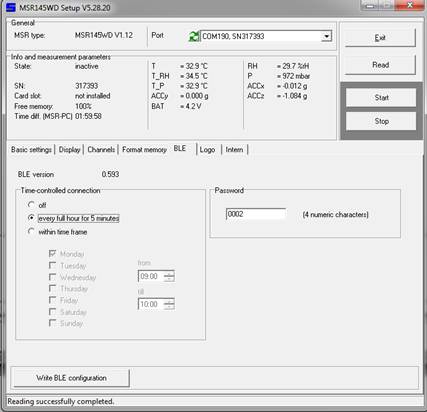
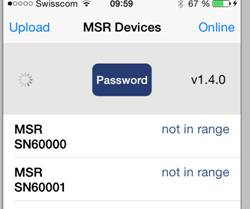
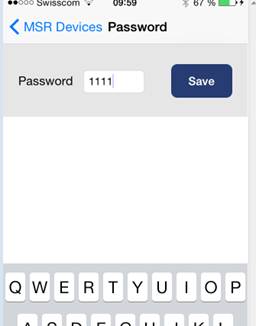
2. Password function To ensure that the data is protected against unauthorised access, you can now protect its retrieval with a password on the smartphone app, which you define in the MSR Setup software.
a) Define the password in the MSR Setup: |
|
b) Enter the password in the MSR Data Logger app: |
|
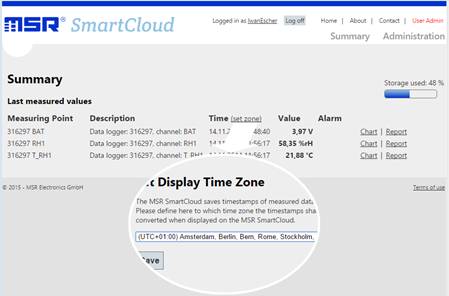
3. Time setting of the MSR SmartCloud to Universal Time Coordinated (UTC) |
|
In order to prevent complications with the interpretation of data from different time zones in the SmartCloud (e.g. data measured during transportation monitoring from Switzerland to China) or when changing the clocks (summer/winter time), the MSR145WD data loggers are now by default set to UTC, i.e. time zone changes are not taken into account during the measurements. The measured data that has been transferred to the MSR SmartCloud is also stored there in UTC and displayed in UTC by default. However, the user can specify in the MSR SmartCloud, in which local time the data is supposed to be displayed. On the one hand, this affords him/her the opportunity to view the data in the local time of his/her location. On the other hand, it allows the user to correctly display data that was measured in a different time zone. 4. Now up to 5 pressure sensors. What has previously already been possible for the temperature and humidity sensors for the MSR145WD – i.e. selecting up to five sensors of the same measurements – is now also possible for the pressure sensor with immediate effect. |


|
Brand Names |
|
All brands, trade names, trade marks, and logos are the property of their respective owners. |


|
Ph: +27 (011) 683 4365 / 6 E-mail: sales@instrumentsgroup.co.za
Physical Address: 3 Angelica Ave, Glenvista, Johannesburg, 2091 SOUTH AFRICA
Postal Address: As Above. |

|
This Month’s Special |

|
Click Ex-Series for Spec. Also: Thermal Imagers |
